Metadata
aliases: []
shorthands: {}
created: 2022-02-28 16:06:34
modified: 2022-03-24 14:27:53
Plotly is a useful Python library that can be used among other things to display 3D meshes. Here are some examples of how to use this feature.
Important: plotly accepts meshes in the separate arrays convention.
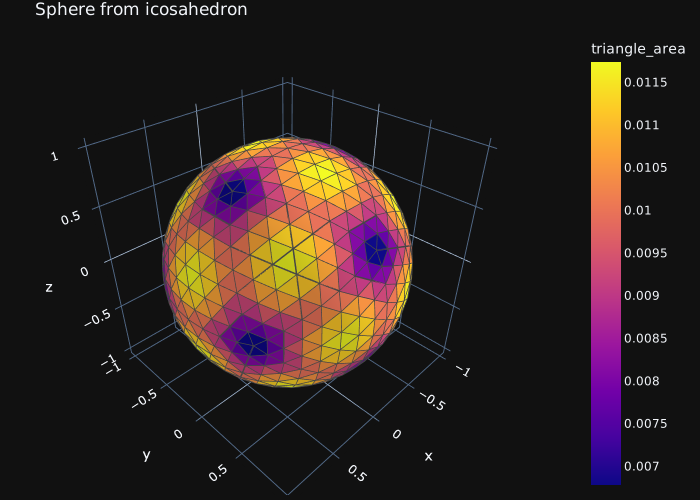
This example shows how the figure was done in Sphere mesh from icosahedron subdivision. For the calculation method of triangle areas, see this.
Here we use intensitymode='cell', which is why we can set the color for every triangle separately, so the intensity argument has to have the same length as i. If we want to set the color for every vertex, the intensitymode='cell' line should be deleted and the intensity argument should be given an array of length the same as x.
import numpy as np
import plotly.graph_objects as go

# Generate the sphere mesh
x, y, z, i, j, k = generate_icosahedron(1)
x, y, z, i, j, k = subdivide_triangles(x, y, z, i, j, k, 3)
for n in range(len(x)):
        R = np.sqrt(x[n]**2 + y[n]**2 + z[n]**2)
        x[n] = x[n]/R
        y[n] = y[n]/R
        z[n] = z[n]/R

# Calculate the triangle areas
areas = triangle_areas(x, y, z, i, j, k)
max_area = max(areas)

fig = go.Figure(data=[
    go.Mesh3d(
        x=x, y=y, z=z,
        # i, j and k give the vertices of triangles
        i=i, j=j, k=k,
        name='mesh',
        showscale=True,
        # Set the gradient for the intensities
        colorbar_title='triangle_area',
        colorscale=[[0.0, 'gold'],
                    [0.5 * max_area, 'mediumturquoise'],
                    [1.0 * max_area, 'magenta']],
        # Color of each face, based on triangle area
        intensity = areas,
        # Set the intensity to per-triangle
        intensitymode='cell',
    )
])

# Set title, layout and the dark theme
fig.update_layout(title='Sphere from icosahedron', margin={'autoexpand': True,'b': 5,'l': 5,'r': 5,'t': 30,}, autosize=True, width=700, height=500, template="plotly_dark", scene={'aspectmode': "data"})
fig.show()
The above example results in the following figure:
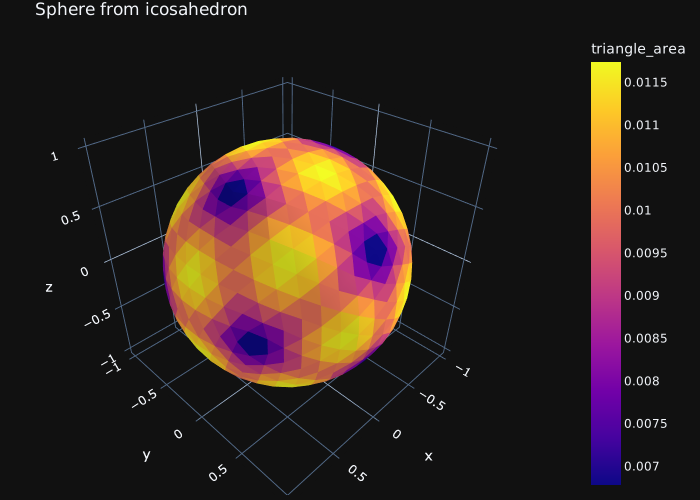
When we also want to show the wireframe of the shape, we have to generate the Xe, Ye, Ze arrays as well, which store the line stripes for the individual triangles, separated by None values.
import numpy as np
import plotly.graph_objects as go

# Generate the sphere mesh
x, y, z, i, j, k = generate_icosahedron(1)
x, y, z, i, j, k = subdivide_triangles(x, y, z, i, j, k, 3)
for n in range(len(x)):
        R = np.sqrt(x[n]**2 + y[n]**2 + z[n]**2)
        x[n] = x[n]/R
        y[n] = y[n]/R
        z[n] = z[n]/R

# Calculate the triangle areas
areas = triangle_areas(x, y, z, i, j, k)
max_area = max(areas)

# Put line stripes in separate arrays and split them with None values
# so they get drawn separately - this results in a nice wireframe
Xe = []
Ye = []
Ze = []
for face_n in range(len(i)):
    Xe.append(x[i[face_n]])
    Xe.append(x[j[face_n]])
    Xe.append(x[k[face_n]])
    Ye.append(y[i[face_n]])
    Ye.append(y[j[face_n]])
    Ye.append(y[k[face_n]])
    Ze.append(z[i[face_n]])
    Ze.append(z[j[face_n]])
    Ze.append(z[k[face_n]])
    Xe.append(None)
    Ye.append(None)
    Ze.append(None)

fig = go.Figure(data=[
    go.Mesh3d(
        x=x, y=y, z=z,
        # i, j and k give the vertices of triangles
        i=i, j=j, k=k,
        name='mesh',
        showscale=True,
        # Set the gradient for the intensities
        colorbar_title='triangle_area',
        colorscale=[[0.0, 'gold'],
                    [0.5 * max_area, 'mediumturquoise'],
                    [1.0 * max_area, 'magenta']],
        # Color of each face, based on triangle area
        intensity = areas,
        # Set the intensity to per-triangle
        intensitymode='cell',
    ),
    # The wireframe part
    go.Scatter3d(
        x=Xe,
        y=Ye,
        z=Ze,
        mode='lines',
        name='',
        # Color and width is changeable
        line=dict(color= 'rgb(70,70,70)', width=3)
    )
])

# Set title, layout and the dark theme
fig.update_layout(title='Sphere from icosahedron', margin={'autoexpand': True,'b': 5,'l': 5,'r': 5,'t': 30,}, autosize=True, width=700, height=500, template="plotly_dark", scene={'aspectmode': "data"})
fig.show()
This example results in the following figure: